Page 1 of 1
Posted: Mon Oct 02, 2006 8:48 pm
by Artois
Like everyone else here I absolutely love the MoC series (and the crew behind it) so I'm not being ungrateful, but I think because we love them so much we let them slide on some things which I think need to be addressed, in particular unnecessary PAL > NTSC pre-conversion (or vice versa but I don't think its as prevalent?) which has introduced needless artefacts into our beloved DVDs.
I can understand the reasoning behind releasing NTSC discs in an attempt to sell to the US market, however one would assume that the vast majority of those who would actually go through the hassle to import DVDs would also have picked up a multiregion player for the same price as a single order. So is sacrificing quality really worth those extra sales? Isn't that against what MoC stands for?
I know it only affects a few discs (Kwaidan and Faust off the top of my head, haven't watched Spione yet but have heard it has 'jaggies' too) and to most people it's probably not a huge issue because they are (currently) practically unnoticable, however when upscaling to 1920x1080 (which inevitably we all will be) artefacts become glaringly obvious.
With the upcoming Mizoguchi / Naruse boxsets providing a perfect opportunity for MoC to one-up Criterion, what do other people feel about this? I'd love to hear your thoughts on this nick, is this something which was only experimented with, or will it be an ongoing practice?
Posted: Mon Oct 02, 2006 8:59 pm
by What A Disgrace
Uh. I thought that the reason that MoC has NTSC discs was that they licensed NTSC elements?
Spione has jaggies because its a non-progressive transfer. And...I have to admit I can't see anything wrong with Kwaidan, except for the colour issues.
Posted: Mon Oct 02, 2006 9:16 pm
by Artois
Obviously NTSC discs created from NTSC masters are fine, I mean only the discs which are converted.
Sorry for the lack of specificity I've only watched it once so far, but In Kwaidan I remember noticing the jaggies near the start shortly after the bucket of water is raised up, in the shot of the new wife looking at some kind of fabrics, you can notice the jaggies in her hair, also at the same period the shot of the protagonist down below near horses, as he moves you can see the weird effect on his chest (the line of his kimono).
Posted: Tue Oct 03, 2006 2:32 am
by peerpee
I think maybe you have your wires crossed. MoC have never done any PAL > NTSC conversions.
What DVD player are you using? What type of cable/plug connects it to the television? and what sort of television are you using? (LCD, CRT, Plasma?)
Posted: Tue Oct 03, 2006 9:07 pm
by Artois
Ahh, well that's good to know. Is it possible that the master you were given had been pre-converted? My first inclination was that it was something wrong with my setup and I spent ages going through and checking everything.
I upscale with an HTPC connected to a HD CRT via component. 3:2 pulldown is handled by NVIDIA PureVideo. I could provide a screenshot but if noone else is able to see it at the points I mentioned then I guess it has to be my setup.
Posted: Wed Oct 04, 2006 8:42 am
by Hashi
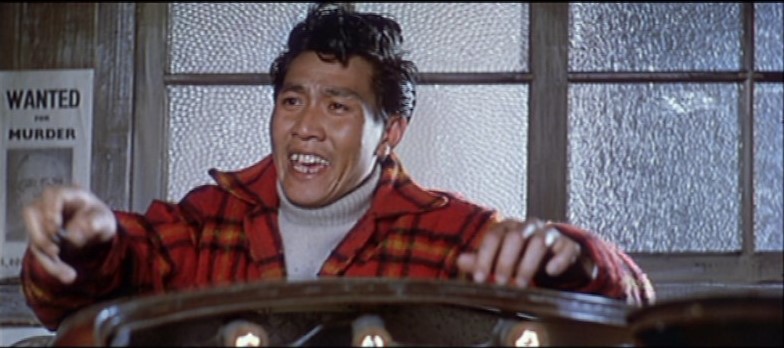
Could someone then explain what are those artefacts in the
Beaver caps of Savage Innocents?
Weird horizontal lining evident in random places especially areas of eyes/mouth/teeth etc. Is is a problem of those captures? Haven't inspected my disc that carefully yet.
OT: A bit similar effect was evident on recently watched New Yorker disc of Zetterling's Loving Couples, though progressive there were lots of weird jaggies (not interlaced combing) evident almost all the time on round/curved shapes. I know my setup is fine (dvd connected with component to a projector, no hd upscaling or anything), the same thing happens when watching on my PC.
Posted: Wed Oct 04, 2006 10:00 am
by Artois
I haven't got around to Savage Innocents yet but mouth/teeth is usually one of the most common areas that I've noticed the jaggies in the films which suffer from them.
Posted: Wed Oct 04, 2006 10:07 am
by peerpee
Artois wrote:Ahh, well that's good to know. Is it possible that the master you were given had been pre-converted? My first inclination was that it was something wrong with my setup and I spent ages going through and checking everything.
That's not possible because among other things it would have thrown up many problems when being encoded progressively, and we didn't have them.
I upscale with an HTPC connected to a HD CRT via component. 3:2 pulldown is handled by NVIDIA PureVideo. I could provide a screenshot but if noone else is able to see it at the points I mentioned then I guess it has to be my setup.
I'm not au fait with HTPC setups unless they're Mac-based. Is anyone else having any HTPC (PC) display problems with KWAIDAN? It's fine with Macs and this is the first problem we've heard so there's a good chance it's an isolated software/hardware incompatibility.
Posted: Wed Oct 04, 2006 10:11 am
by peerpee
Hashi wrote:Weird horizontal lining evident in random places especially areas of eyes/mouth/teeth etc. Is is a problem of those captures? Haven't inspected my disc that carefully yet.
Can't see what you're referring to?
Posted: Wed Oct 04, 2006 11:12 am
by CSM126
Hashi wrote:Weird horizontal lining evident in random places especially areas of eyes/mouth/teeth etc. Is is a problem of those captures? Haven't inspected my disc that carefully yet.
You need to get your monitor checked, I think. When I look at those caps, the pics look fine. No jaggies or whatever.
Posted: Wed Oct 04, 2006 3:58 pm
by Cinesimilitude
Im on a mac and I dont see any problems with the screencaps either.
Posted: Wed Oct 04, 2006 4:42 pm
by Matt
I see what Hashi is talking about in the screen captures, but I can't imagine these tiny, tiny compression artifacts would be visible while the picture is in motion (compare to
original image):
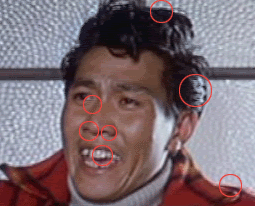
I mean, you can only expect so much from a standard-definition DVD.
Posted: Wed Oct 04, 2006 11:04 pm
by Monsieur Verdoux

Well i can't see any difference as the circles are in the way... what are we looking at here?
Posted: Thu Oct 05, 2006 1:40 am
by davebert
[edit]
I seem to no longer understand forum structures.
Posted: Thu Oct 05, 2006 3:20 am
by Matt
Monsieur Verdoux wrote: Well i can't see any difference as the circles are in the way... what are we looking at here?
Look
inside the circles, genius.
Posted: Tue Oct 24, 2006 7:13 pm
by Hashi
Matt wrote:I see what Hashi is talking about in the screen captures, but I can't imagine these tiny, tiny compression artifacts would be visible while the picture is in motion (compare to
original image):
I mean, you can only expect so much from a standard-definition DVD.
Thanks Matt! Glad my eyes are not failing me completely and my monitor doesn't seem to need checking after all.
Anyway, the initial question what are these artifacts? I finally checked the disc, on moving image those were almost nonexistant.